Every enquiry in one list
Walk-ins, phone calls, referrals and your website form all land in the same place.
- Where each enquiry came from
- A warning when the same parent enquires twice
- Handed to one person to follow up
Every enquiry in one list with a follow-up date, an admission form parents fill in on their phone, and approval that creates the student record by itself. Nothing is typed twice.
Part of CrossKloud School, our cloud school ERP. Everything below is available today.
Walk-ins, phone calls, referrals and your website form all land in the same place.
Each enquiry has a stage and a next follow-up date. The follow-ups due list shows who to call today.
Open admission for each class with your own dates, age limits and number of seats.
On the Academic and Complete plans, parents can pay the registration fee with the form, through your school's own Razorpay account.
The office works through applications, each with a clear status.
When you approve an application, the student is created in the class and section you choose.
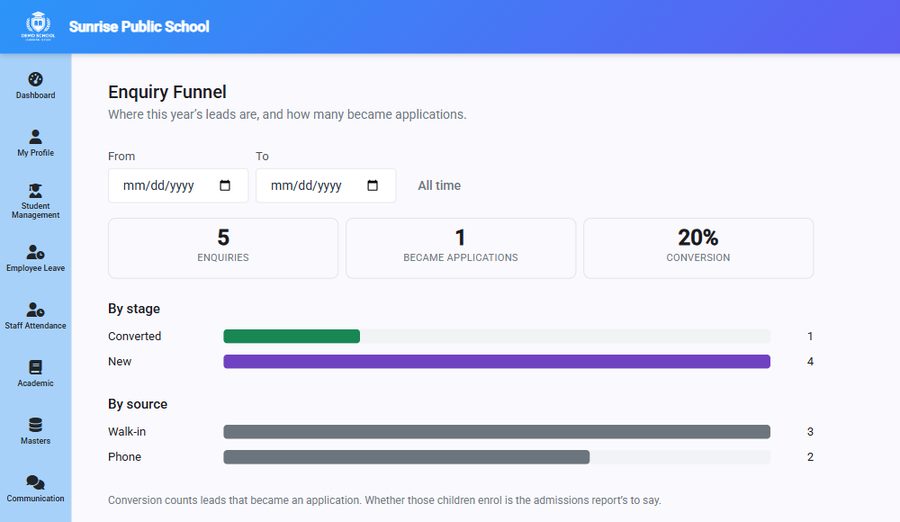
The funnel shows how many enquiries were contacted, applied, were approved and joined, so you can see where families drop out. Reports show the follow-ups that are due, why enquiries were lost and admissions by branch.
Better you hear it from us now than find out after you sign.
We set it up with you before your admission season opens.
Classes open for admission, seats, age limits, the documents you ask for and any registration fee.
We open admission for each class, put the form and enquiry links on your school website and, if you want online payment, connect your Razorpay account.
The admissions team learns enquiries, follow-ups, applications and approval.
Share the form link with parents and start following up every enquiry from day one.
Yes. The admission form runs in the browser on any phone or computer. Parents upload documents and the child's photo with it, and can check their application status online.
Yes, on the Academic and Complete plans. Your school opens its own Razorpay account and parents pay with the form. You can also leave the fee at zero or collect it at the office.
Yes. For each class you set the dates admission is open, the minimum and maximum age and the number of seats. Parents see whether the child is eligible before they apply.
The student is created in the class and section you choose, with an admission number, and logins are created for the student and the parent. Details from the form are carried across, so nobody types them again.
Yes. When a parent who has already enquired is entered again, the system warns you and shows the earlier enquiry.
Yes. The admission form, enquiries and follow-ups are on every plan, including Core. Online payment of the registration fee needs the Academic or Complete plan.
Book a free demo and we'll show enquiries, the admission form and approval set up the way your school admits.