Online exam software for schools

Online exam software for schools

Build papers from your own question bank, run timed exams on a computer or phone, and let the software mark them. Marks go straight onto the report card, with nothing retyped.

What it does

Part of CrossKloud School, on the Academic and Complete plans. Everything below is available today.

Question bank

Your questions, filed to be found again

Teachers write questions once, by class and subject, and reuse them in any paper.

  • Multiple choice, true or false, and more than one correct answer
  • A diagram on any question
  • All-or-nothing or partial credit for multi-answer questions
Import

Load a whole sheet of questions

Already have questions in a spreadsheet? Import them from Excel or CSV using our template.

  • Every row is checked before anything is saved
  • Questions already in the bank are skipped, not doubled
  • Fix the rows it names and import again
Papers

Papers built the way you set them

Pick questions into a paper, split it into sections and set the rules before it opens.

  • Sections with their own headings
  • Opening time and minutes allowed
  • Negative marking, never below zero for a question
Sitting

Students sit it on any device

Students open their paper in the browser, on a school computer or their own phone.

  • A clock showing time left
  • Answers keep saving through a dropped connection
  • The penalty for a wrong answer is shown before they start
Invigilation

Watch the exam while it runs

Staff see who has started, who is answering and who has handed in.

  • Live list of every student's state
  • Extra minutes for one child who started late
  • Search by name or roll number
Results

Marked, checked, then published

The paper marks itself. Staff check the result before anyone else sees it.

  • Question-by-question breakdown for each student
  • Void a faulty question for everyone
  • Publishing puts the marks on the report card
On the student's phone

Built for a phone, not squeezed onto one

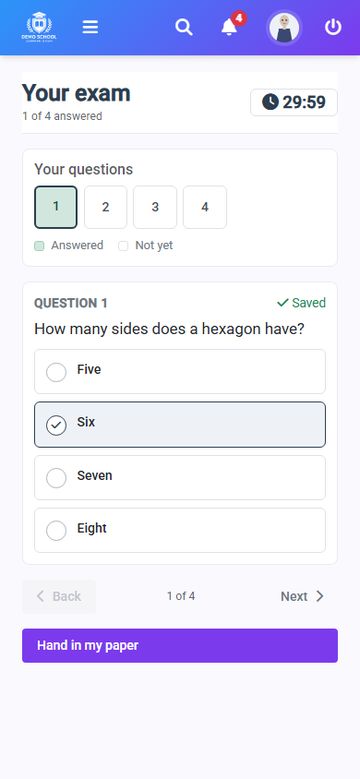
Most students sit online tests on a phone. The paper shows the time left and marks each question as answered or not yet. When the connection drops, answers wait and save once it is back. Parents and students see the score only after the school publishes it.

  • Nothing to install: it runs in the browser
  • Published results visible to the student and parents
  • Results export to PDF and Excel
A student sitting a timed online exam on a phone

What it does not do yet

Better you hear it from us now than find out after you sign.

  • Objective questions only: multiple choice and true or false. Written answers are not marked online yet; enter those marks in the gradebook as usual.
  • No webcam proctoring or tab-switch alarms. Online exams suit class tests and practice papers that a teacher supervises.
  • No separate mobile app. Students use the web app on any phone, with nothing to install.

Your first online exam

Most schools start with one class test, then widen it.

  1. Fill the question bank

    Type questions in, or send us your spreadsheet and we import it using our template.

  2. Build a paper

    Choose the questions, add sections if you need them, and set the time and any negative marking.

  3. Run it

    Students sit it at the opening time. Staff watch progress and give extra time where needed.

  4. Check and publish

    Look at the results, void a faulty question if there is one, then publish to the report card.

Questions schools ask about online exams

Can students take the exam on a phone?

Yes. The exam runs in the browser on any phone, tablet or computer, with nothing to install. Answers keep trying to save if the connection drops, and save once it is back.

Does the software mark the paper?

Yes, for the question types it supports: multiple choice, true or false, and questions with more than one correct answer. Staff check the results before publishing them.

Can we use negative marking?

Yes. The paper can take marks off for wrong answers. No question scores below zero, and students see the penalty before they start.

Can we import our existing questions?

Yes. Questions can be imported from Excel or CSV using our template. Every row is checked first, and nothing is imported until the whole sheet is right.

Do online exam marks go on the report card?

Yes. When the school publishes an exam that counts toward the report card, its marks appear on that term's report card with nothing retyped.

Is it suitable for board exams?

No. It is meant for class tests, unit tests and practice papers that a teacher supervises. There is no webcam proctoring.

Which plan includes online exams?

Online exams are on the Academic and Complete plans.

Try a paper yourself

Book a free demo and sit a short online exam on your own phone, then see how it is marked.