School fee management software

School fee management software for Indian schools

Fee structures, invoices, receipts, concessions, refunds and dues in one place. Parents see what they owe and can pay online. Your accounts office stops reconciling registers by hand.

What it does

Part of CrossKloud School, our cloud school ERP. Everything below is available today.

Set up

Fee heads, structures and instalments

Define tuition, transport, exam and any other fee head once, then build fee structures per class.

  • Regular, scholarship and staff-ward structures
  • Instalment plans with your own due dates
  • Each school keeps its own structures
Billing

Invoices for one child or a whole class

Raise invoices one at a time or in bulk, and check them before any parent sees them.

  • Bulk invoices for a class in one step
  • Draft invoices approved before release
  • A running ledger for every student
Collection

Receipts for every mode of payment

The counter records cash, cheque and bank transfer, and every payment gets a PDF receipt.

  • PDF invoices and receipts
  • Cheque tracking until the cheque clears
  • Bank reconciliation for each school
Online

Parents pay online

On the Academic and Complete plans, parents pay through Razorpay into your school's own account.

  • Parents see their own dues, invoices and receipts
  • The receipt is issued when the payment succeeds
  • Cash and cheque still work alongside
Adjustments

Concessions, late fees and refunds

Every change to what a family owes is recorded, with who made it.

  • Sibling and staff-ward concessions
  • Late fees on overdue amounts
  • Refunds with a second approver
  • Write-offs kept apart from money paid
Reports

Know what is due and what came in

The accountant and the owner see the same numbers, by class, fee head and payment mode.

  • Fee defaulter list, class by class
  • Fee head-wise collection
  • Demand and collection summary
  • PDF and Excel export
Who sees what

Each person sees only their part

The accountant works with invoices, receipts and reports. The owner and principal see collections and dues on their dashboard. Parents see only their own children's fees. Permissions are set for each role and checked on the server, not just hidden on the screen.

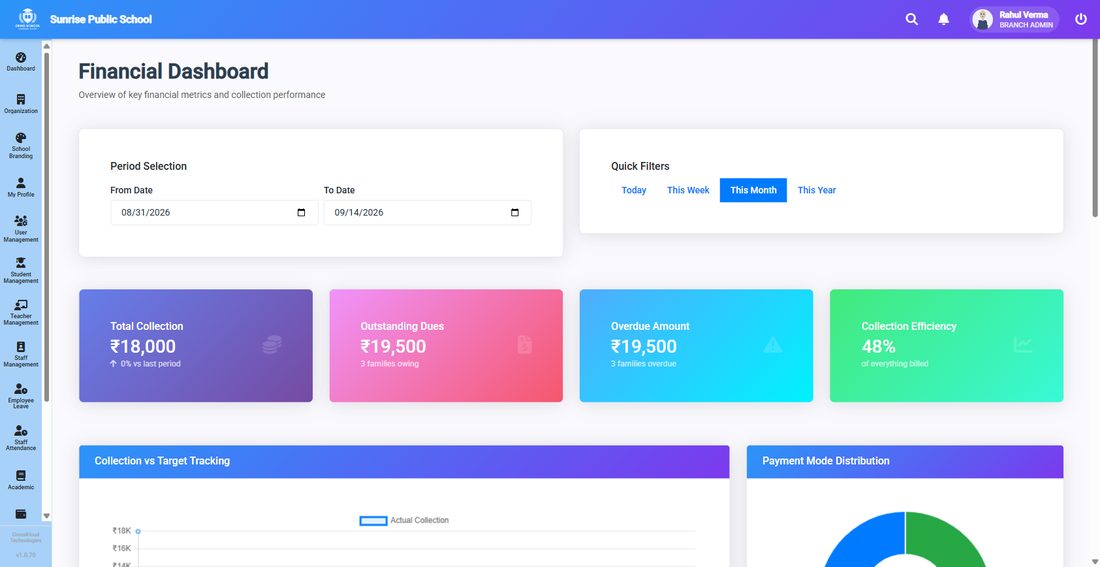
  • Dashboard of fees collected today, this session and overdue
  • Several branches in one system, each with its own fees
  • A record of who changed what, and when
CrossKloud School fee dashboard showing collections and dues

What it does not do yet

Better you hear it from us now than find out after you sign.

  • No direct export to Tally yet. Reports export to Excel, which your accountant can use for entries.
  • SMS and WhatsApp messages to parents need your school's DLT registration and approved templates before they can go out. We help you with both.
  • No separate mobile app. Parents and staff use the web app on any phone, with nothing to install.

Moving your fees across

We do the setup with you. Your accountant does not start from a blank screen.

  1. Send us your fee chart

    Your fee heads, class-wise amounts, concessions and instalment dates, in whatever form you keep them.

  2. We set it up

    We build your fee structures and import your students from Excel, so nothing is retyped by hand.

  3. We train your accountant

    The accounts office learns invoices, receipts, concessions and reports on your own data.

  4. Start at a clean point

    Most schools go live at the start of a term or a fee instalment, so old and new records do not mix.

Questions schools ask about fees

What is school fee management software?

It is software that keeps a school's fee structures, invoices, receipts, concessions, refunds and dues in one place, so the accounts office stops working from registers and spreadsheets, and parents can see what they owe.

Can parents pay school fees online?

Yes, on the Academic and Complete plans. Your school opens its own Razorpay account and we connect it, so parents' payments go straight to your school's bank account. The office can still record cash, cheque and bank transfer.

Does it handle sibling and staff-ward concessions?

Yes. Concessions are recorded against the student with the reason. Scholarship and staff-ward fee structures can also be set up separately.

Can we see who has not paid?

Yes. The fee defaulter report lists unpaid dues class by class, and the dashboard shows overdue amounts. Reports export to PDF and Excel.

Is fee management included in every plan?

Yes. Fee structures, invoices, receipts and dues are in every plan, including Core. Online payment by parents is on the Academic and Complete plans.

Does it export to Tally?

Not directly yet. Fee reports export to Excel, which your accountant can use for Tally entries.

See it on your own fee chart

Book a free demo and we'll show the fee module with your fee heads and classes.