
Income tax helper
Estimate your income tax under the old and new regimes, presumptive taxation, advance tax, bank statement import, and an ITR-4 summary to file from.
The tax rules built in are for FY 2025-26 (AY 2026-27). When today is in a later year, a banner says so, and invoices from the later year are not counted: enter that income yourself. Treat every figure as an estimate and have your CA confirm it before filing.
#The five tabs
| Regime Calculator | Old and new regimes side by side, and which costs less |
| Presumptive | Income under sections 44AD, 44ADA and 44AE |
| Advance Tax | Instalments, and interest for paying late |
| Bank Statement Import | Read a bank CSV and sort each transaction |
| ITR Summary | The year in one place, and the ITR-4 summary PDF |
What you type on the first three tabs is remembered in this browser.
#Regime Calculator
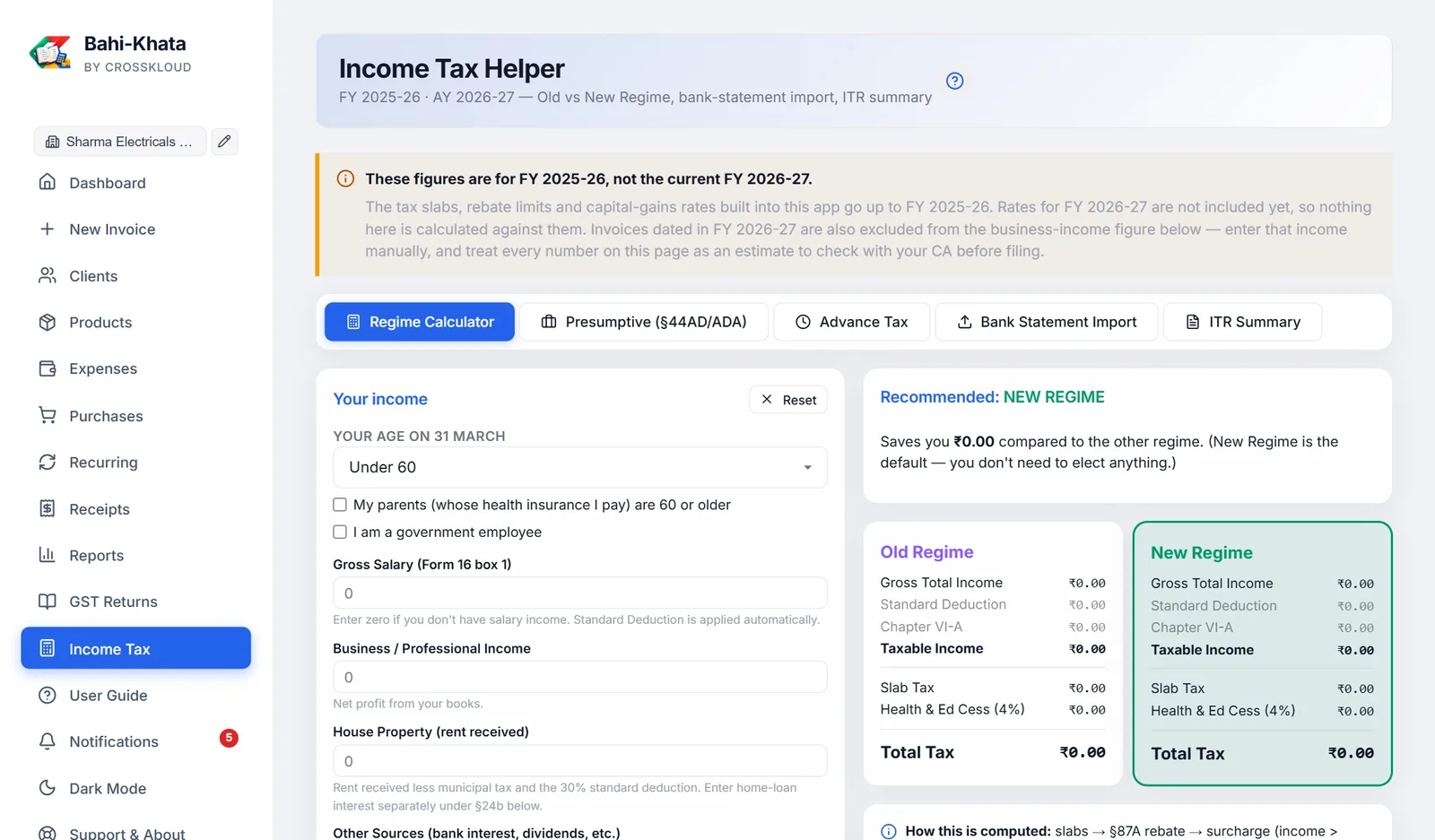
First tell it your age (under 60, 60 to 79, or 80 or older), whether your parents are 60 or older, and whether you are a government employee. These decide the old-regime slabs and the limits for 80D, 80DDB and 80CCD(2).
Then enter your income, in rupees, for the year:
- Gross Salary, as in box 1 of Form 16. The standard deduction is applied for you.
- Business / Professional Income: filled in from your rupee sales, less purchases and business expenses, all without GST, if you leave it at zero. Change it if your books say otherwise.
- House Property (rent less municipal tax and the 30% deduction; home-loan interest goes under 24(b) below), Other Sources such as bank interest, and capital gains on listed shares: short-term at 20%, long-term at 12.5% above ₹1.25 lakh.
- Deductions, which only reduce old-regime tax: 80C, 80CCD(1B), 80D, 80TTA, 80TTB, 80E, 80G, 80GG, 80DDB, 80U and home-loan interest under 24(b). Each shows its limit.
- 80CCD(2), employer NPS, allowed under both regimes.
The right side shows each regime: gross income, deductions, taxable income, slab tax, capital-gains tax, rebate under 87A, surcharge, 4% cess and Total Tax. The cheaper one is marked Recommended, with how much it saves. To use the old regime you must file Form 10-IEA before the due date. Reset clears everything.
#Presumptive income
Choose the section that fits you:
| 44AD | Trading, retail and manufacturing. Enter digital and cash turnover: 6% of digital and 8% of cash counts as income. The limit is ₹3 crore if cash is no more than 5% of turnover, otherwise ₹2 crore. |
| 44ADA | Professionals such as CAs, doctors, lawyers and consultants. 50% of receipts counts as income, up to ₹75 lakh of receipts (₹50 lakh if cash is over 5%). |
| 44AE | Owners of up to 10 goods vehicles. ₹1,000 per tonne per month for heavy vehicles, ₹7,500 per month for others. |
If your real profit is higher, enter it: you cannot declare less than the presumptive figure. Warnings appear if you are over a limit. Use ₹… as Business Income copies the result into the calculator.
#Advance tax
Based on the recommended regime's tax, less TDS already deducted. If what is left is under ₹10,000, no advance tax is due.
Otherwise the schedule shows how much is due by 15 June (15%), 15 September (45%), 15 December (75%) and 15 March (100%). Tick Presumptive to pay it all by 15 March instead. Add the payments you made with + Add payment, and the interest for paying late or short, under sections 234B and 234C, is worked out.
#Bank statement import
- Download a CSVFrom net-banking or your bank's app, save the statement for the year as CSV. Excel files must be saved as CSV first; PDFs are not accepted.
- Drop it inSBI, HDFC, ICICI, Axis, Kotak, PNB and Yes Bank formats are recognised, and most others work too. It is read on your computer; nothing is uploaded.
- Check the categoriesEach transaction is sorted by its description, such as salary, interest, rent received, investments, insurance, GST or business expense. Change any that are wrong. Mark your sales receipts as Business receipts yourself.
- Push to the calculatorPush to Calculator adds business receipts, interest, rent (less 30%), 80C and 80D to the calculator. Each statement can be pushed once; import it again to push a fresh copy.
The imported statement is not kept after you leave the screen.
#ITR Summary and the ITR-4 PDF
The year's figures from the app: sales, trading purchases and business expenses (all without GST, and without drawings and asset purchases) and net business income, then salary, rent, other income and capital gains from the calculator, and the tax under each regime.
Download ITR-4 Summary makes a PDF with each ITR-4 (Sugam) field worked out, from income to deductions to tax and advance tax, to copy into incometax.gov.in or hand to your CA. ITR-4 is only for some taxpayers: if you have capital gains, or income above the limits, you need a different form.