
Getting around the app
The sidebar, switching business, notifications, quick search with Ctrl + K, keyboard shortcuts and dark mode.
#Support & About
Who makes the app and how to reach us: email, WhatsApp and the website. It also lists what else CrossKloud does for businesses, such as setup and moving your data from Tally or Excel, and links to the terms you accepted, the privacy policy and the open-source notices. See Support & About.
#Switching business
With more than one business saved, click its name at the top of the sidebar and choose another. Every screen changes to that business's invoices, purchases, expenses, receipts, recurring invoices, reports and returns. Manage profiles… opens Settings.
#Notifications
The bell shows a count of things that need you. Clicking it lists them, and clicking one takes you there:
- 🔁 recurring invoices created today
- ⚠ overdue invoices
- ⏰ invoices due in the next 3 days
- 📋 GST, TDS, TCS, advance tax and ITR dates in the next 10 days
- 📦 products low on stock
Mark all as read clears the list. Anything new brings it back. The bell counts all your businesses together.
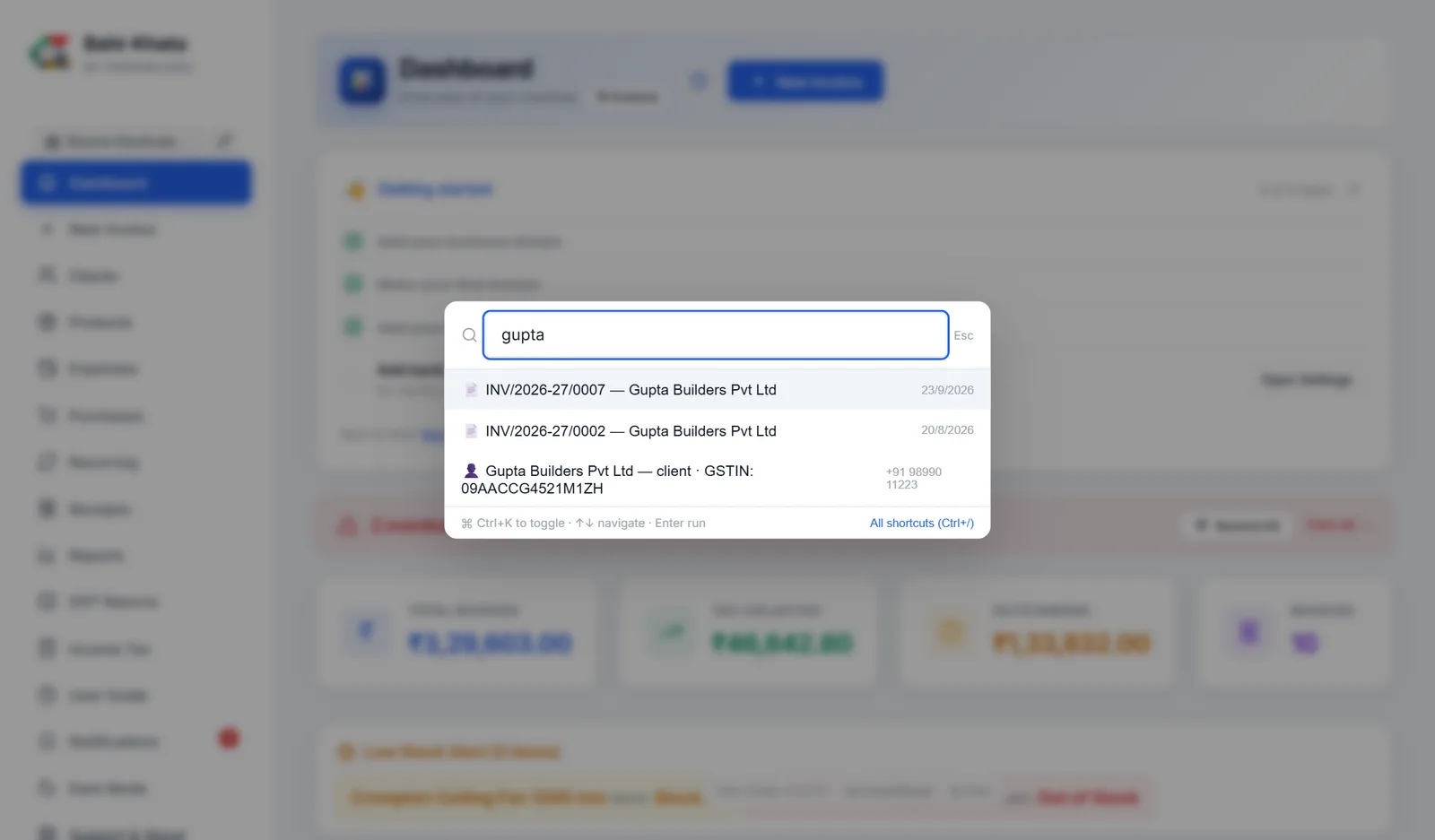
#Quick search: Ctrl + K
Press Ctrl + K anywhere, even while typing, and start typing. You can:
- go to any screen, or start a new invoice;
- open an invoice by its number or client;
- find a client by name or GSTIN, or a product by name or HSN, which opens their list;
- jump to Settings, switch dark mode, or see what is new in an update.
Use ↑ ↓ and Enter. Esc closes it.
#Keyboard shortcuts
| Ctrl + K | Quick search |
| Ctrl + N | New invoice |
| Ctrl + / | Show all shortcuts |
| Esc | Close a dialog |
| Enter | Confirm a dialog |
On the invoice screen there are more: see Keyboard shortcuts on this screen. On a Mac, use ⌘ instead of Ctrl.
#Dark mode
Dark Mode in the sidebar switches the app to dark colours, and Light Mode switches back. Invoices and PDFs always print in their normal colours.
#Opening it like a desktop app
In Chrome and Edge, the app may offer Install App. It then opens in its own window with its own icon, like any other program, and right-clicking the icon jumps straight to New Invoice or GST Returns. It is the same app and the same data.
#"Needs a Quick Start"
If the app's engine is not running, the page says Bahi-Khata by CrossKloud Needs a Quick Start. Your data is safe. Double-click Bahi-Khata on your Desktop and click Open App; the page carries on by itself once it is running.